Starting a YouTube channel can feel overwhelming at first, especially if you have no prior experience with video creation or online platforms. However, YouTube remains one of the most powerful tools for sharing ideas, building an audience, and even creating a sustainable income. With the right approach, clear goals, and consistent effort, beginners can grow from zero subscribers to a meaningful presence on the platform.
This guide walks you through everything you need to know, from setting up your channel to publishing your first videos and building long-term growth. Whether your goal is education, entertainment, personal branding, or business, this beginner-friendly guide will help you start the right way.
Understanding What YouTube Is and How It Works
YouTube is more than just a video-sharing website. It is a search engine, a social platform, and a content ecosystem driven by algorithms that recommend videos to users based on interest and behavior.
At its core, YouTube rewards:
- Videos that keep viewers watching
- Content that gets engagement (likes, comments, shares)
- Consistency and reliability from creators
As a beginner, understanding this helps you focus on creating useful and engaging content instead of chasing shortcuts.
Choosing Your YouTube Channel Niche
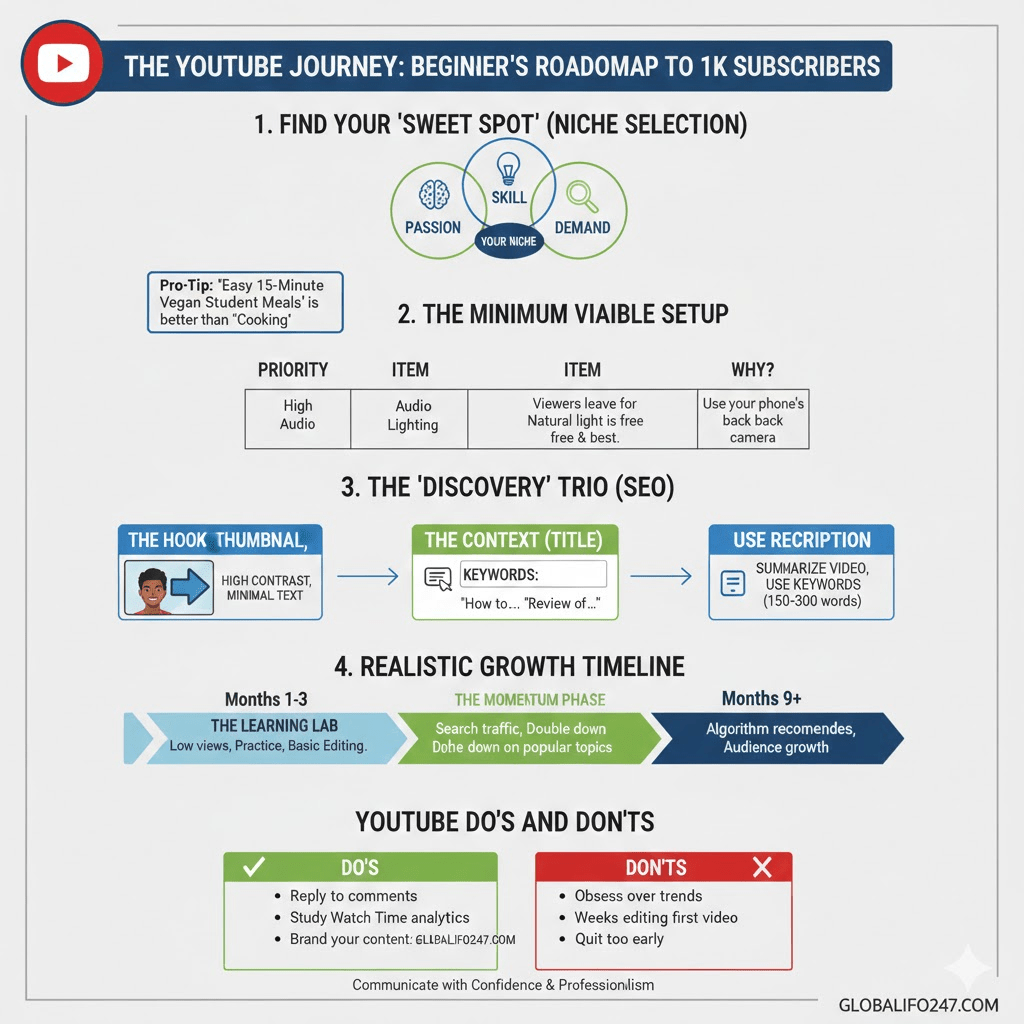
One of the most important decisions you will make is choosing what your channel will be about. Your niche defines your audience, content style, and long-term growth potential.
What Is a YouTube Niche?
A niche is a focused topic area your channel consistently covers. Examples include:
- Tech tutorials
- Gaming
- Personal finance
- Fitness and health
- Education
- Vlogging
- Product reviews
How to Choose the Right Niche
When choosing a niche, balance three factors:
- Interest – You should genuinely enjoy the topic.
- Knowledge or willingness to learn – You don’t need to be an expert, but you must be committed.
- Audience demand – People should be actively searching for or watching similar content.
Avoid choosing a niche solely because it is popular. Trends change, but passion and consistency last.
Creating a Google Account and Setting Up Your Channel
To start a YouTube channel, you need a Google account.
Steps to Create Your Channel
- Sign in to YouTube using your Google account.
- Click on your profile picture and select “Create a channel.”
- Choose a channel name:
- Use your real name for personal branding.
- Use a descriptive name for niche-focused content.
- Upload a profile picture and banner.
Your channel name and visuals should clearly communicate what your channel is about.
Read Also: 10 Most Profitable Farming Businesses You Can Start Today!
Customizing Your Channel for a Professional Look
A well-designed channel builds trust and encourages visitors to subscribe.
Key Customization Elements
- Channel Banner
Your banner should:
- Reflect your niche
- Include your posting schedule (if possible)
- Be clear on desktop and mobile
2. About Section
This section should explain:
- Who you are
- What your channel offers
- Why viewers should subscribe
3. Channel Trailer
A short introductory video helps new visitors understand your content quickly. Keep it under one minute and speak directly to the viewer.
Equipment You Need to Start (Without Overspending)
Many beginners delay starting because they believe they need expensive equipment. This is not true.
Basic Equipment for Beginners
| Equipment | Beginner Recommendation | Notes |
|---|---|---|
| Camera | Smartphone or basic webcam | Modern phones are more than enough |
| Microphone | Budget lapel or USB mic | Audio quality matters more than video |
| Lighting | Natural light or simple ring light | Avoid dark, grainy videos |
| Editing Software | Free tools like CapCut or DaVinci Resolve | No need for paid software initially |
Start with what you have. Upgrade only when your channel grows.
Planning Your Content Before Recording
Successful channels don’t upload random videos. They follow a clear content plan.
Content Planning Basics
- Write down at least 10 video ideas before starting.
- Focus on beginner-friendly topics.
- Solve problems or answer common questions in your niche.
Video Formats for Beginners
Some formats are easier to start with:
- Tutorials and how-to videos
- Explanatory videos
- Reaction or commentary videos
- Screen recordings
Choose formats that match your skills and comfort level.
Recording Your First YouTube Video
Recording your first video can feel intimidating, but confidence improves with practice.
Recording Tips
- Record in a quiet space.
- Speak clearly and at a natural pace.
- Look at the camera lens to maintain eye contact.
- Don’t aim for perfection; aim for clarity.
Mistakes are normal. Many successful creators cringe at their first videos, yet those videos started their journey.
Editing Your Videos for Better Engagement
Editing improves watch time and keeps viewers interested.
Beginner Editing Principles
- Remove long pauses and mistakes.
- Add simple text for emphasis.
- Use background music carefully and quietly.
- Keep transitions clean and minimal.
Your goal is not cinematic perfection but smooth and understandable content.
Uploading and Optimizing Your Videos
Uploading a video is not just about clicking “publish.” Optimization helps your video get discovered.
Important Optimization Elements
- Title
Your title should:
- Clearly describe the video
- Include keywords people search for
- Be natural, not clickbait
2. Description
Write at least 150–300 words explaining:
- What the video is about
- Key topics covered
- Helpful links if relevant
3. Tags
Tags help YouTube understand your content, especially for new channels.
4. Thumbnail
A good thumbnail:
- Is clear and readable
- Uses minimal text
- Shows emotion or focus
Thumbnails significantly impact click-through rate.
Understanding YouTube Consistency and Growth
Many beginners quit too early because they don’t see fast results.
What Realistic Growth Looks Like
- First 1–3 months: Learning and low views
- 3–6 months: Gradual improvement
- 6–12 months: Algorithm starts recognizing your content
Consistency matters more than frequency. One quality video per week is better than daily low-effort uploads.
Engaging With Your Audience
YouTube is a community-driven platform.
Ways to Build Engagement
- Reply to comments thoughtfully.
- Ask viewers questions in your videos.
- Pin comments to encourage discussion.
Engagement tells YouTube that your content is valuable.
Monetization: How Beginners Eventually Earn from YouTube
Making money should not be your first focus, but it is a long-term benefit.
Common Monetization Methods
- YouTube Partner Program (ads)
- Affiliate marketing
- Sponsored content
- Selling digital products or services
Most creators start earning only after building trust and consistency.
Common Beginner Mistakes to Avoid
Many beginners struggle because of avoidable mistakes:
- Copying others instead of developing a voice
- Uploading without a clear niche
- Obsessing over views instead of improvement
- Quitting too early
Progress comes from learning and adapting.
Starting a YouTube Channel at a Glance
| Step | Key Focus |
|---|---|
| Choose a niche | Interest + audience demand |
| Set up channel | Branding and clarity |
| Get basic equipment | Prioritize audio |
| Plan content | Solve viewer problems |
| Record and edit | Clear and engaging |
| Optimize uploads | Titles, thumbnails, descriptions |
| Stay consistent | Long-term mindset |
Frequently Asked Questions (FAQ)
1. How long does it take to grow a YouTube channel?
Growth varies for everyone. Most beginners need at least six months of consistent uploads before seeing meaningful traction. Learning, experimenting, and improving play a bigger role than time alone.
2. Do I need to show my face to succeed on YouTube?
No. Many successful channels use screen recordings, voiceovers, animations, or slides. What matters is value, clarity, and engagement.
3. How many videos should I upload as a beginner?
Start with one video per week. This allows you to focus on quality and learning without burning out.
4. Can I start YouTube with just a phone?
Yes. Many creators start with smartphones. Focus on good lighting and clear audio to improve video quality.
5. What should my first video be about?
Your first video should introduce a topic that helps your target audience. Tutorials, beginner guides, or common questions work very well.
6. Is YouTube still worth starting today?
Yes. YouTube continues to grow, and new creators succeed daily. Audiences care more about relevance and authenticity than how old a channel is.
Starting a YouTube channel is not about instant fame or viral success. It is about learning, improving, and consistently delivering value to an audience. Beginners who approach YouTube with patience, curiosity, and a long-term mindset are far more likely to succeed.
Start with what you have, focus on helping viewers, and allow yourself room to grow. Every successful YouTuber started with zero subscribers. The most important step is starting.
Read Also: What are The Job Prospects for Agricultural Careers?