WordPress is one of the most powerful and popular website platforms in the world, which also makes it a common target for hackers. Many beginners assume their site is too small to attract attacks, but in reality, most hacking attempts are automated. Bots scan the internet constantly, looking for vulnerable WordPress sites regardless of size or purpose.
Securing your WordPress website is not optional. A single security breach can lead to stolen data, damaged reputation, malware infections, search engine penalties, or complete loss of your site. The good news is that WordPress security does not require advanced technical skills. With the right practices and tools, you can significantly reduce the risk of attacks and keep your website safe.
This guide explains WordPress security from beginner to intermediate level. It covers common threats, essential security steps, practical tools, and long-term habits that protect your site from hackers.
Why WordPress Websites Get Hacked
Understanding why attacks happen helps you focus on the right security measures.
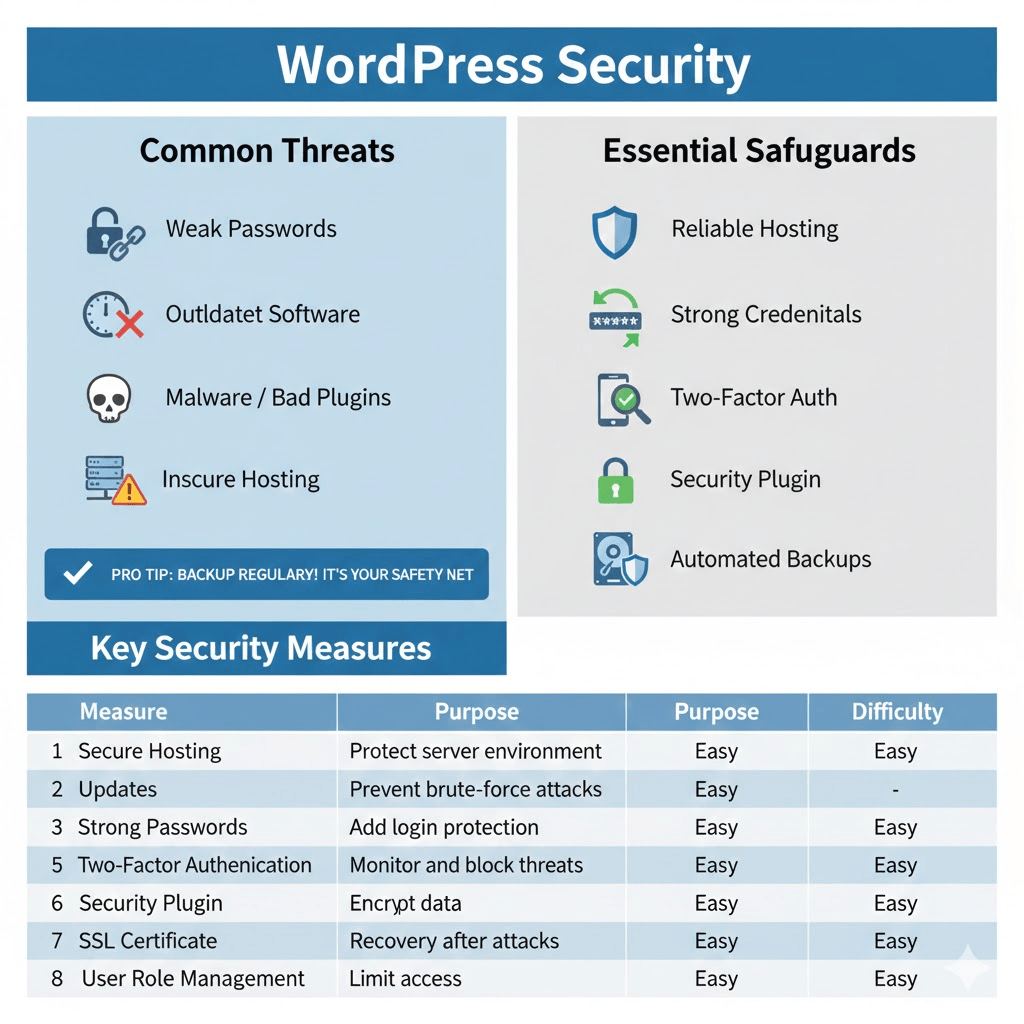
Most WordPress hacks occur due to:
- Weak passwords
- Outdated WordPress core, themes, or plugins
- Poor-quality plugins or themes
- Lack of basic security configuration
- Insecure hosting environments
Hackers rarely target a site personally. Instead, automated tools search for known vulnerabilities and exploit them. If your site is unprotected, it becomes an easy target.
Start With Secure Web Hosting
Website security begins with your hosting provider. Even a well-configured WordPress site can be compromised if the hosting environment is weak. A secure hosting provider should offer:
- Regular server-level security updates
- Malware scanning
- Firewall protection
- Secure file permissions
- Account isolation between websites
Cheap or unmanaged hosting plans often lack proper security measures. Choosing a reputable hosting provider is one of the most important security decisions you will make.
Keep WordPress Updated at All Times
Outdated software is the most common entry point for hackers.
Why Updates Matter
WordPress core updates often include security patches that fix known vulnerabilities. The same applies to themes and plugins. When you delay updates, you leave your site exposed to attacks that are already well-documented.
Best Update Practices
Enable automatic updates for:
- WordPress core
- Minor security releases
- Trusted plugins and themes
Before major updates, ensure you have a recent backup in case compatibility issues arise.
Read Also: Economic Importance, Uses, and By-Products of Mushroom Spores
Use Strong Login Credentials
Weak login details make it easy for attackers to break into your site using brute-force attacks.
Password Best Practices
Strong passwords should:
- Be long and unique
- Include letters, numbers, and symbols
- Avoid common words or personal information
Never reuse passwords across multiple sites. Using a password manager makes it easier to generate and store secure passwords.
Secure Your Admin Username
Avoid using “admin” as your username. Attackers often assume this username during login attempts. Use a unique username that is difficult to guess.
Enable Two-Factor Authentication
Two-factor authentication adds an extra layer of security to your login process. After entering your password, you must provide a second form of verification, such as:
- A one-time code from an authenticator app
- A confirmation sent to your email
Even if someone steals your password, they cannot log in without the second factor.
Limit Login Attempts
Unlimited login attempts allow attackers to guess passwords repeatedly until they succeed. Limiting login attempts blocks repeated failed login tries from the same IP address. This protects your site from brute-force attacks and reduces server strain.
Many security plugins include this feature and allow you to customize lockout rules.
Install a Reliable WordPress Security Plugin
Security plugins simplify many protective tasks and monitor your site continuously. A quality security plugin can:
- Block malicious traffic
- Scan for malware
- Monitor file changes
- Enforce strong passwords
- Alert you to suspicious activity
Choose a well-reviewed, actively maintained plugin from a trusted developer. Avoid installing multiple security plugins at once, as they can conflict with each other.
Protect Your wp-admin and Login Pages
The WordPress login and admin pages are common attack targets. You can improve security by:
- Changing the default login URL
- Restricting access by IP address
- Adding CAPTCHA to login forms
- Using HTTPS encryption
These measures make automated attacks much harder and reduce unauthorized access attempts.
Use HTTPS and an SSL Certificate
HTTPS encrypts data transferred between your website and visitors. Without SSL, login credentials and form data can be intercepted. HTTPS protects sensitive information and also improves trust and search engine rankings.
Most hosting providers offer free SSL certificates. Once enabled, ensure your site forces HTTPS on all pages.
Set Proper File Permissions
Incorrect file permissions can allow hackers to modify critical WordPress files. As a general rule:
- Files should not be writable by everyone
- Directories should have restricted access
- Configuration files should be protected
Proper permissions prevent unauthorized changes and reduce the impact of a compromised account.
Disable File Editing from the Dashboard
WordPress allows administrators to edit theme and plugin files directly from the dashboard. While convenient, this feature can be dangerous.
If a hacker gains admin access, they can inject malicious code through the editor. Disabling file editing removes this risk. This change does not affect normal site functionality and improves overall security.
Regularly Back Up Your Website
Backups are your safety net. Even with strong security, no site is completely immune to attacks. Effective backups should be:
- Automated
- Stored off-site
- Created regularly
- Easy to restore
If your site is hacked, a clean backup allows you to recover quickly without starting from scratch.
Monitor User Roles and Permissions
Not everyone needs full administrative access. Assign users only the permissions they need. For example:
- Editors can manage content but not settings
- Contributors can write posts but not publish
- Administrators should be limited to trusted users only
Review user accounts periodically and remove inactive or unnecessary users.
Avoid Pirated Themes and Plugins
Using nulled or pirated WordPress products is extremely risky. Pirated themes and plugins often contain hidden malware, backdoors, or tracking code. These threats are difficult to detect and can compromise your site silently. Always download themes and plugins from official sources or reputable marketplaces.
Secure Your Database
Your WordPress database stores all content, users, and settings. To improve database security:
- Use a strong database password
- Change default database prefixes
- Limit database user privileges
These steps reduce the impact of attacks that target database access.
Scan Your Site for Malware Regularly
Malware can exist on a site without obvious symptoms. Some malicious code runs silently in the background, sending spam or redirecting visitors. Regular scanning helps detect threats early before they cause serious damage.
Security plugins or hosting tools can automate malware scans and notify you of issues.
Security Measures
| Security Measure | Purpose | Difficulty Level |
|---|---|---|
| Secure Hosting | Protect server environment | Easy |
| Updates | Patch vulnerabilities | Easy |
| Strong Passwords | Prevent brute-force attacks | Easy |
| Two-Factor Authentication | Add login protection | Easy |
| Security Plugin | Monitor and block threats | Easy |
| SSL Certificate | Encrypt data | Easy |
| Backups | Recovery after attacks | Easy |
| User Role Management | Limit access | Easy |
Common WordPress Security Mistakes
Many website owners ignore security until something goes wrong. Common mistakes include skipping updates, using weak passwords, installing too many plugins, and failing to back up data.
Another frequent error is assuming security plugins alone are enough. Plugins help, but security works best when combined with good hosting, strong credentials, and smart habits.
Frequently Asked Questions (FAQ)
1. Can a small WordPress site really be hacked?
Yes. Most attacks are automated and target vulnerabilities, not specific websites. Size does not protect you.
2. Do security plugins slow down WordPress?
High-quality security plugins are optimized for performance. When configured properly, they have minimal impact on site speed.
3. Is WordPress itself insecure?
No. WordPress core is secure when properly maintained. Most vulnerabilities come from outdated software or poor configuration.
4. How often should I back up my site?
For active websites, daily backups are recommended. Less active sites can back up weekly, but more frequent backups provide better protection.
5. What should I do if my site is hacked?
Immediately take the site offline if possible, restore a clean backup, change all passwords, update everything, and scan for malware.
Securing a WordPress website is not a one-time task but an ongoing process. The good news is that most security threats can be prevented with simple, consistent practices. Strong passwords, regular updates, reliable hosting, and proper backups form the foundation of a secure site.
By implementing the steps in this guide, you dramatically reduce your risk of hacking and protect both your website and your visitors. Start with the basics, stay consistent, and treat security as an essential part of managing your WordPress site rather than an optional add-on.
Do you have any questions, suggestions, or contributions? If so, please feel free to use the comment box below to share your thoughts. We also encourage you to kindly share this information with others who might benefit from it. Since we can’t reach everyone at once, we truly appreciate your help in spreading the word. Thank you very much for your support and for sharing!
Read Also: How to Create a Website: Step-by-Step Guide for Beginners